


Whether you’re planning a quick weekend getaway from JFK–or the best small airport in America–or mapping out extensive holiday travel to see family, airfare often eats up the largest chunk of your travel budget.
If you’re wondering how to find cheap flights on Google, the platform’s dedicated “Cheapest” tab is the ultimate tool for budget-conscious travelers.
This feature completely changes how you hunt for deals by letting you prioritize your budget over everything else. But before you lock in that unbelievably cheap fare, you need to understand exactly what you’re signing up for.
Here’s how the tool works to score you massive flight deals—and the crucial catch you need to watch out for.
Bypassing the standard “convenience” filters
When you input a destination into Google Flights, the algorithm automatically generates a list of “Best” flights.
These routes are selected based on a delicate balance of price and convenience—factoring in direct flights, total travel time, and preferred airlines.
The Cheapest tab throws convenience out the window.
By toggling over to this dedicated filter, the algorithm bypasses the “Best” criteria entirely, scouring the web to show you the absolute lowest prices available, no matter how chaotic the route might be.
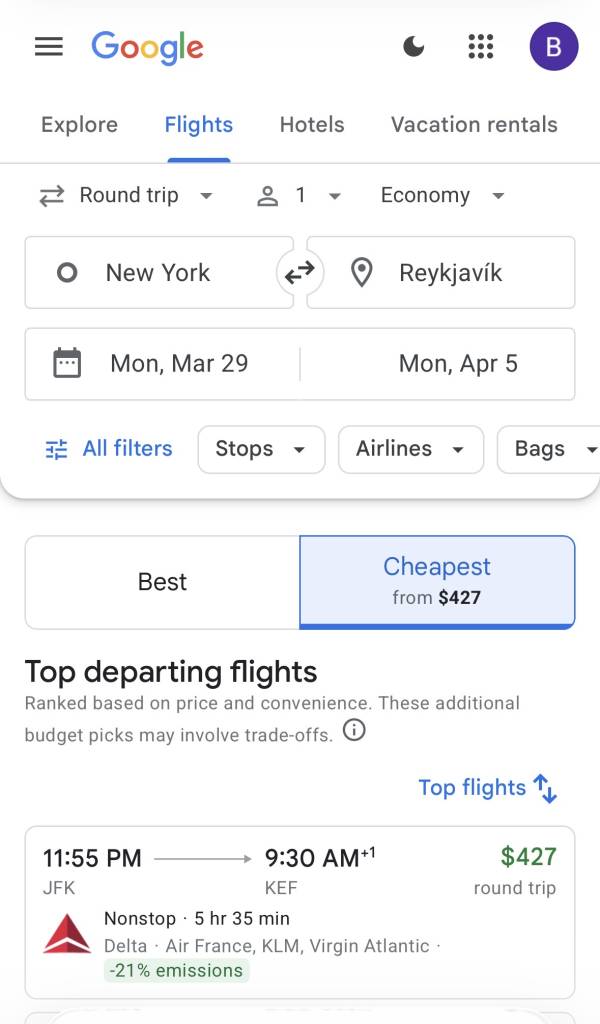
The catch: Prepare for “creative” itineraries
Unlocking the ultimate budget travel deals often means making a few sacrifices. Google itself notes that using the Cheapest tab may result in some “creative itineraries.”
If you want the rock-bottom price, you need to be prepared for a few major tradeoffs:
- Airport Swaps: You might depart from LaGuardia (LGA) but have your return flight land at Newark (EWR) to save a few hundred dollars
- Self-Transfers: This is a big one. You may be required to collect your checked luggage mid-trip and re-check it yourself with a completely different airline for your connecting flight
- Longer Layovers: You could find yourself waiting several extra hours at a connecting airport
- Third-Party Booking: The cheapest route might require you to book through a third-party online travel agency (OTA) rather than directly with the airline
Look for the price drop guarantee
Booking flights in advance can be stressful, especially if you’re worried about prices dropping a week later. To give passengers peace of mind, Google offers a Price Guarantee badge on select itineraries.
If you book a flight featuring this badge and the price drops before your departure date, Google promises to cover the difference. They’ll automatically refund you the price drop amount via Google Pay, ensuring you actually got the best deal possible.

When to book for maximum savings
If you want to maximize your savings using the Cheapest tab, timing is everything.
If you still need to book your Thanksgiving or winter travel, historical data shows that mid-October is generally the optimal window to lock in domestic holiday flights before prices inevitably skyrocket in November.
Pair this booking window with the Cheapest tab—and a willingness to embrace the catch—to ensure you’re getting the best possible rate.
Don’t miss out! Follow us on Facebook, Instagram, and now on WhatsApp, too!